Identify Empty Dimensions
Finds all rows and columns in which all cells are empty or blank.
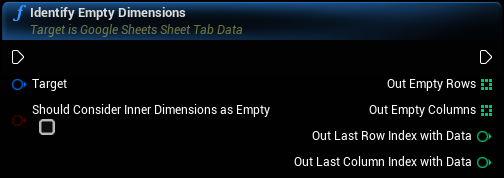
Inputs
|
In
Exec
|
|
|
Target
Google Sheets Sheet Tab Data Object Reference
|
|
|
Should Consider Inner Dimensions as Empty
Boolean
|
If true, dimensions the come before the last dimension with data will be considered for removal. If false, only dimensions that come after the last dimension with data will be considered. For example, if an empty row comes before the last row with data in it, setting this to true will remove that row. |
Outputs
|
Out
Exec
|
|
|
Out Empty Rows
Array of Integers
|
Indices of empty rows which have no data |
|
Out Empty Columns
Array of Integers
|
Indices of empty columns which have no data |
|
Out Last Row Index with Data
Integer
|
The index of the last row which has data |
|
Out Last Column Index with Data
Integer
|
The index of the last column which has data |