Find Instances
Assuming this data Sheet Tab Data Object is correctly configured and GetStartingCell() returns a valid cell,
search for and find (optionally, all) instances of a specified string, output as an array of cells in A1 notation.
Only searches the final display values ond not formulae.
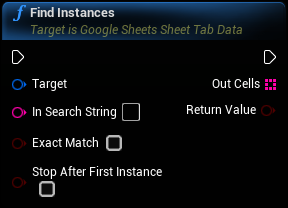
Inputs
|
In
Exec
|
|
|
Target
Google Sheets Sheet Tab Data Object Reference
|
|
|
In Search String
String
|
The string to search for |
|
Exact Match
Boolean
|
If true, InSearchString must match the cell exactly in order to be returned as a found instance. |
|
Stop After First Instance
Boolean
|
If true, the output array will be 1 item in length and the loop will break when the first item is found. |
Outputs
|
Out
Exec
|
|
|
Out Cells
Array of Strings
|
An array of cells in A1 notation which match InSearchString. |
|
Return Value
Boolean
|