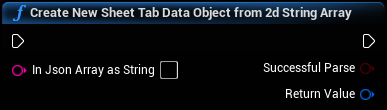
Create New Sheet Tab Data Object from 2d String Array
Returns a UGoogleSheetsSheetTabData object parsing the values from a 2D JSON String array. May be in standard JSON format with the key "values", all wrapped in curly braces. Example, '{"values": [["one","two","three"]["four","five","six"]]}' or it may lack the field decorators, i.e. '[["one","two","three"]["four","five","six"]]'
Inputs
|
In
Exec
|
|
|
In Json Array as String
String
|
The input array as string. Example, '{"values": [["one","two","three"]["four","five","six"]]}' or '[["one","two","three"]["four","five","six"]]' |
Outputs
|
Out
Exec
|
|
|
Successful Parse
Boolean
|
Output boolean, returns true if InJsonArrayAsString could be parsed. |
|
Return Value
Google Sheets Sheet Tab Data Object Reference
|
A new UGoogleSheetsObjectSheet Tab Data Object with the values from InJsonArrayAsString added to its internal value array. Returns nullptr if SuccessfulParse returns false. |