Set Dimension Hidden
Hide or show columns or rows.
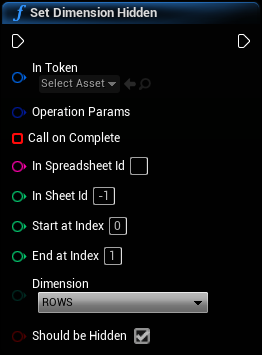
Inputs
|
In
Exec
|
|
|
In Token
Google Sheets Web Token Object Reference
|
A validated UGoogleSheetsWebToken object. Used to authenticate the Sheets operation. |
|
Operation Params
Google Sheets Operation Params Structure
|
Generic request operation parameters |
|
Call on Complete
Delegate (by ref)
|
This delegate will be called when the operation completes and tell you whether or not it was successful and return the response as a string. |
|
In Spreadsheet Id
String
|
This is the spreadsheet ID number or key. Get it from your spreadsheet URL by calling GetSpreadsheetIdFromUrl. |
|
In Sheet Id
Integer
|
The ID number or GID of the sheet tab. Must not be negative. |
|
Start at Index
Integer
|
The first row or column index that will be hidden. This index is 0-based, so column A or Row 1 will be index 0. |
|
End at Index
Integer
|
The final row or column index that will be hidden. This index is 0-based, so column A or Row 1 will be index 0. |
|
Dimension
EGoogleSheetsMajorDimension Enum
|
The dimension which will be hidden |
|
Should be Hidden
Boolean
|
Whether or not to hide the dimension |
Outputs
|
Out
Exec
|