Request Google Sheets Sheet Value Range
Return a range of values from a given sheet as a UGoogleSheetsSheetTabData object.
This method does not allow for reading from multiple ranges.
Range can be a single cell ("A1") or a simple from:to of connected cells ("A1:D12").
Specify a whole column ("A:A") or a whole column after a certain row ("A2:A").
You can even specify a group of connected columns after a certain row ("A4:D").
Leave blank to include the entire sheet.
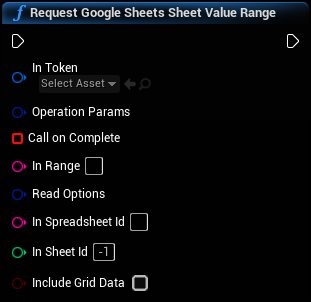
Inputs
|
In
Exec
|
|
|
In Token
Google Sheets Web Token Object Reference
|
A validated UGoogleSheetsWebToken object. Used to authenticate the Sheets operation. |
|
Operation Params
Google Sheets Operation Params Structure
|
Generic request operation parameters |
|
Call on Complete
Delegate (by ref)
|
This delegate will be called when the operation completes and tell you whether or not it was successful and return the response as a UGoogleSheetsObjectSheet Tab Data Object. |
|
In Range
String
|
A single range, expressed in A1 notation, that you wish to retrieve. See warning for more info or call GetRangeInA1NotationFromColumnAndRowIndices passing in 1-based indices. |
|
Read Options
Google Sheets Read Options Structure
|
A struct of options that you can use to customize the read. Default options are usually best for compatibility reasons. |
|
In Spreadsheet Id
String
|
This is the spreadsheet ID number or key. Get it from your spreadsheet URL by calling GetSpreadsheetIdFromUrl. |
|
In Sheet Id
Integer
|
The GID for the desired sheet tab |
|
Include Grid Data
Boolean
|
If true, the resulting data object will include meta data such as text and cell formatting. Avoid using this option with extremely large sheets (5k+ lines). Getting values only without meta data is much faster on Google's end and uses much less memory on Unreal's end. If you must get meta from an entire sheet larger than 5k lines, get it in parts e.g. A1:A1000 then A1001:A2000 and combine the resulting data objects. |
Outputs
|
Out
Exec
|