Make Common Sheet Tab Properties
Generates a JSON representation of some of the more commonly-used properties of a sheet tab.
Leave values empty (or negative, in the case of integers) to keep the default values or auto-generate them on Google's end.
Note that boolean properties are always set, so ensure these are correctly true or false each time you call this function.
With the exception of InDesiredSheetId, these fields can be used to create a new sheet or update an existing sheet's properties.
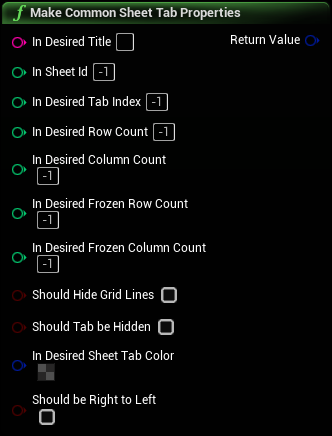
Inputs
|
In Desired Title
String
|
The desired name or title of the sheet tab. Be sure this title doesn't already exist in the spreadsheet! |
|
In Sheet Id
Integer
|
The ID number or GID of the sheet tab. You define this field when creating a new sheet. When updating properties on an existing sheet, this is the ID of the existing sheet. Be sure this ID doesn't already exist if creating a new sheet! If < 0 and you're creating a new sheet, a new ID will be generated for you. |
|
In Desired Tab Index
Integer
|
The desired index of the sheet tab. Also defines order and position of the tab in the UI. If < 0 and you're creating a new sheet, the index will automatically be your current existing sheet count and the sheet will be added at the end. |
|
In Desired Row Count
Integer
|
The desired number of rows in the sheet tab. |
|
In Desired Column Count
Integer
|
The desired number of columns in the sheet tab. |
|
In Desired Frozen Row Count
Integer
|
The desired number of frozen rows in the sheet tab. |
|
In Desired Frozen Column Count
Integer
|
The desired number of frozen columns in the sheet tab. |
|
Should Hide Grid Lines
Boolean
|
Whether or not the sheet tab should display the lines between cells. |
|
Should Tab be Hidden
Boolean
|
Whether or not the sheet tab should be hidden in the UI. |
|
In Desired Sheet Tab Color
Linear Color Structure
|
The desired color of the tab in the UI. |
|
Should be Right to Left
Boolean
|
Whether the sheet should start from the top-left or the top-right. |
Outputs
|
Return Value
Google Sheets Properties Container Structure
|