Insert Dimension
Insert or add blank rows or columns at a specified row or column index. CallOnComplete will return false if InsertAtIndex is larger than then row/column count.
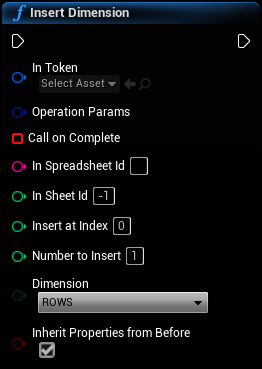
Inputs
|
In
Exec
|
|
|
In Token
Google Sheets Web Token Object Reference
|
A validated UGoogleSheetsWebToken object. Used to authenticate the Sheets operation. |
|
Operation Params
Google Sheets Operation Params Structure
|
Generic request operation parameters |
|
Call on Complete
Delegate (by ref)
|
This delegate will be called when the operation completes and tell you whether or not it was successful and return the response as a string. |
|
In Spreadsheet Id
String
|
This is the spreadsheet ID number or key. Get it from your spreadsheet URL by calling GetSpreadsheetIdFromUrl. |
|
In Sheet Id
Integer
|
The ID number or GID of the sheet tab. Must not be negative. |
|
Insert at Index
Integer
|
The row or column index after which the insertion begins. To insert before e.g. column 1, set to 0. Negative numbers will be interpreted as 0. To insert after index 3, input 3. To append to the end, input the row/column count. |
|
Number to Insert
Integer
|
The number or count of rows or columns to insert in this operation. Values less than 1 will be interpreted as 1. |
|
Dimension
EGoogleSheetsMajorDimension Enum
|
The dimension which will be shifted when inserting cells. If ROWS, existing cells will be shifted down. If COLUMNS, existing cells will be shifted right. |
|
Inherit Properties from Before
Boolean
|
Whether dimension properties should be extended from the dimensions before or after the newly inserted dimensions. True to inherit from the dimensions before (in which case the start index must be greater than 0), and false to inherit from the dimensions after. |
Outputs
|
Out
Exec
|